Data Migration for Nonprofits: A 10‑Point Checklist for Donor and Gift Data
A successful nonprofit CRM migration is less about moving rows and more about agreeing on definitions. If you lock your gift model (gift vs pledge vs payment), your dedup rules, and your coding structure (designations/campaigns), you can migrate cleanly into Dynamics 365 + Dataverse and trust your reports. Most migration failures happen in edge cases: recurring gifts, refunds, soft credits, and mismatched finance totals.
Why nonprofit migrations fail (even when the import “works”)
It’s easy to import data and still end up with a CRM nobody trusts. The usual causes are:
• unclear gift definitions (pledges and payments mixed together)
• duplicates and householding rules that change mid-project
• inconsistent designation and campaign codes
• missing edge-case handling (refunds, tributes, soft credits)
• no reconciliation with Finance
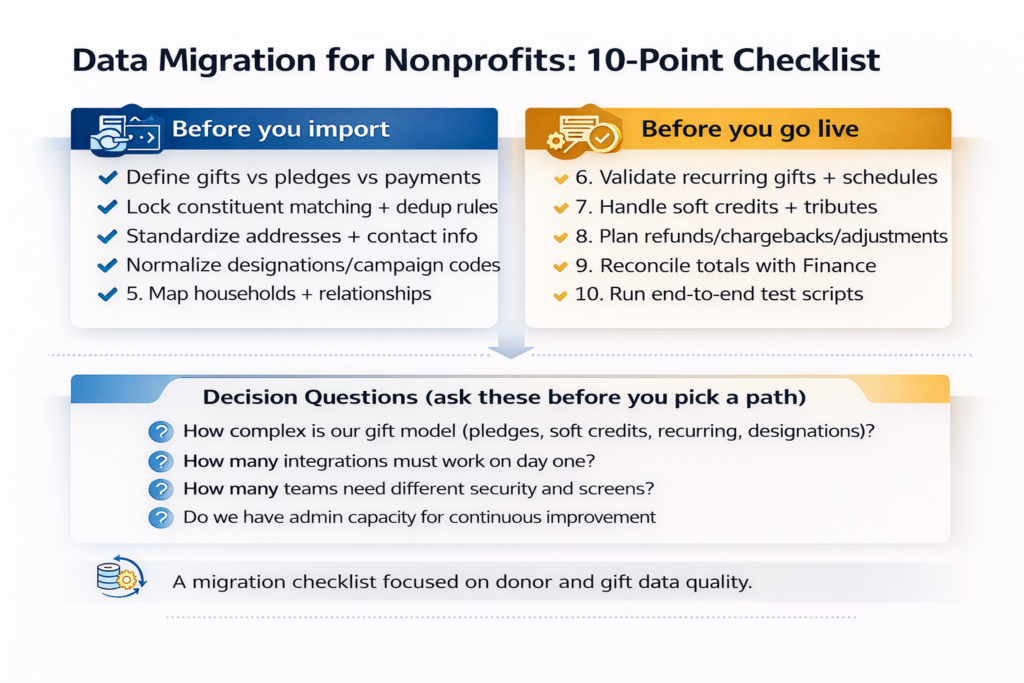
The checklist (with what to do and what to watch)
1) Define gifts, pledges, payments, and adjustments
Write one definition for each, then map every legacy transaction type to one of these categories. If your old system mixes pledge payments inside pledges, separate them now or reporting will stay messy.
2) Set constituent matching and dedup rules
Decide what makes a record “the same person” (email, name + address, phone, donor ID). Create match rules and a merge policy. Assign ownership for merges so it doesn’t become a free-for-all.
3) Standardize contact info and addresses
Normalize country/state formats, fix obvious typos, remove placeholder emails, and decide the hierarchy for preferred email/phone/address.
4) Normalize designation and campaign coding
Create a clean list of designations/funds and campaign/appeal codes. Map old codes to the new list. Retire duplicates and document the rules.
5) Map households and relationships
Decide what “household” means for your org. Map spouse/partner relationships, employers, and org affiliations. Relationships drive stewardship and major gifts, so don’t leave this as a “nice to have.”
6) Validate recurring gifts and schedules
Recurring is the edge case that breaks trust. Validate schedules, next dates, amounts, and whether recurring is managed in your payment gateway or CRM.
7) Handle soft credits and tribute gifts
Soft credits (influence) and tributes (in honor/memory) must be consistent or major gift reporting will be wrong. Agree on where you store tribute fields and how you report them.
8) Plan refunds, chargebacks, and write-offs
Decide how you’ll represent reversals in the new CRM. Map legacy refund types to consistent adjustment logic so net revenue reporting makes sense.
9) Reconcile totals with Finance
Pick a reconciliation method: totals by month, by fund, by campaign, and by payment method. If finance and fundraising totals differ, document why (timing, recognition rules, restricted funds).
10) Run end-to-end test scripts before go-live
Test real scenarios: online donation, event ticket, pledge + payment, recurring gift failure, refund, tribute gift, matching gift, and data correction. Confirm CRM outputs match expectations and reports.
A practical migration sequence (so you don’t drown)
- Week 1: Definitions workshop (gift model, codes, households, consent rules).
- Week 2: Data profiling and cleanup (duplicates, missing values, code normalization).
- Week 3: Mapping + first test load into a sandbox environment.
- Week 4: Validation (sample checks + reconciliation) + fix cycle.
- Week 5: Final load + end-to-end testing + training + go-live checklist.
Where Adovent fits
Adovent runs nonprofit CRM migrations with a “trust-first” approach: define the data rules, clean and map with discipline, load in controlled cycles, and reconcile with Finance before go-live. We also create a post-go-live cleanup rhythm so data quality doesn’t drift back into chaos.
FAQs
How long does a nonprofit CRM migration take?
Small migrations can be done in weeks if definitions are clear and data is clean. Complex systems with multiple integrations typically take months. The biggest driver is data readiness, not the import tool.
What’s the hardest part of donor data migration?
Duplicates, gift model definitions, and recurring gift schedules. These three areas cause most reporting and adoption issues after go-live.
Can we migrate everything?
You can, but you probably shouldn’t. Migrate what you need for ongoing operations and reporting, and archive the rest. A smaller clean dataset beats a huge messy one.