What Is a Nonprofit Technology Audit, and What Should It Cover?
A nonprofit technology audit is a close review of the software your team uses, how information moves between those systems, and where staff lose time working around them.
Quick answer: A good audit covers five areas: your systems, your day-to-day processes, your data and reports, how staff actually use the tools, and whether you are ready for AI. It ends with a short, prioritized plan that says what to keep, what to fix and what to replace.
Below, we cover the warning signs first, then what the audit reviews, how the process works, and what to do with the results.
Signs your nonprofit needs a technology audit
Most organizations don’t go looking for an audit. A problem finds them first. These four come up again and again.
1. The board packet takes a week to build
Reporting should be the easy part. In many offices, it is the hardest.
Picture the week before a board meeting. The development director exports gift data from the CRM (the database where you track donors and the people you serve). The controller pulls numbers from the accounting system. Someone stitches both together in Excel late on a Thursday. As a result, senior staff lose days every quarter, and the board sees numbers nobody fully trusts.
Fix: Write down every step behind your main board report, including who does it and how long it takes. That list is the starting point for an audit. For what a trustworthy board report looks like, see our guide to board-ready reporting in a Microsoft-based CRM.
2. Fundraising and finance report different totals
Two teams, two systems, two answers. This one damages trust fast.
Say finance closes the month showing $412,000 in gala revenue. The CRM shows $398,500. Two weeks later, someone finds the gap: refunds were recorded in accounting but never in the CRM. Meanwhile, the executive director has already quoted the higher number to a major donor.
Fix: Pick one recent campaign and compare its total in both systems. If they don’t match, ask why. The answer usually points to a missing link between systems.
3. Restricted funds live in one person’s spreadsheet
Restricted funds are gifts a donor or funder has earmarked for a specific purpose. Tracking them matters for compliance and for funder trust.
Often, that tracking sits in a spreadsheet only one finance manager understands. When she goes on leave, nobody can answer a funder’s question about how much of a grant is left. However, the risk was there long before she left.
Fix: List every critical spreadsheet your organization depends on and who owns it. Anything that would break if one person left belongs on the audit list.
4. Staff work around the CRM instead of in it
A system nobody uses is just an expensive address book.
For example, a major gifts officer keeps her real prospect notes in a Word file because the CRM screens take too long to update. Her manager only sees half the picture. So forecasts are off, and handovers fall apart when people change roles.
Fix: Ask three frontline staff what they keep outside the CRM, and why. Their answers will tell you more than any software demo.
What should a nonprofit technology audit cover?
A useful audit looks at five areas. Skip one, and the plan you get at the end will have a blind spot.
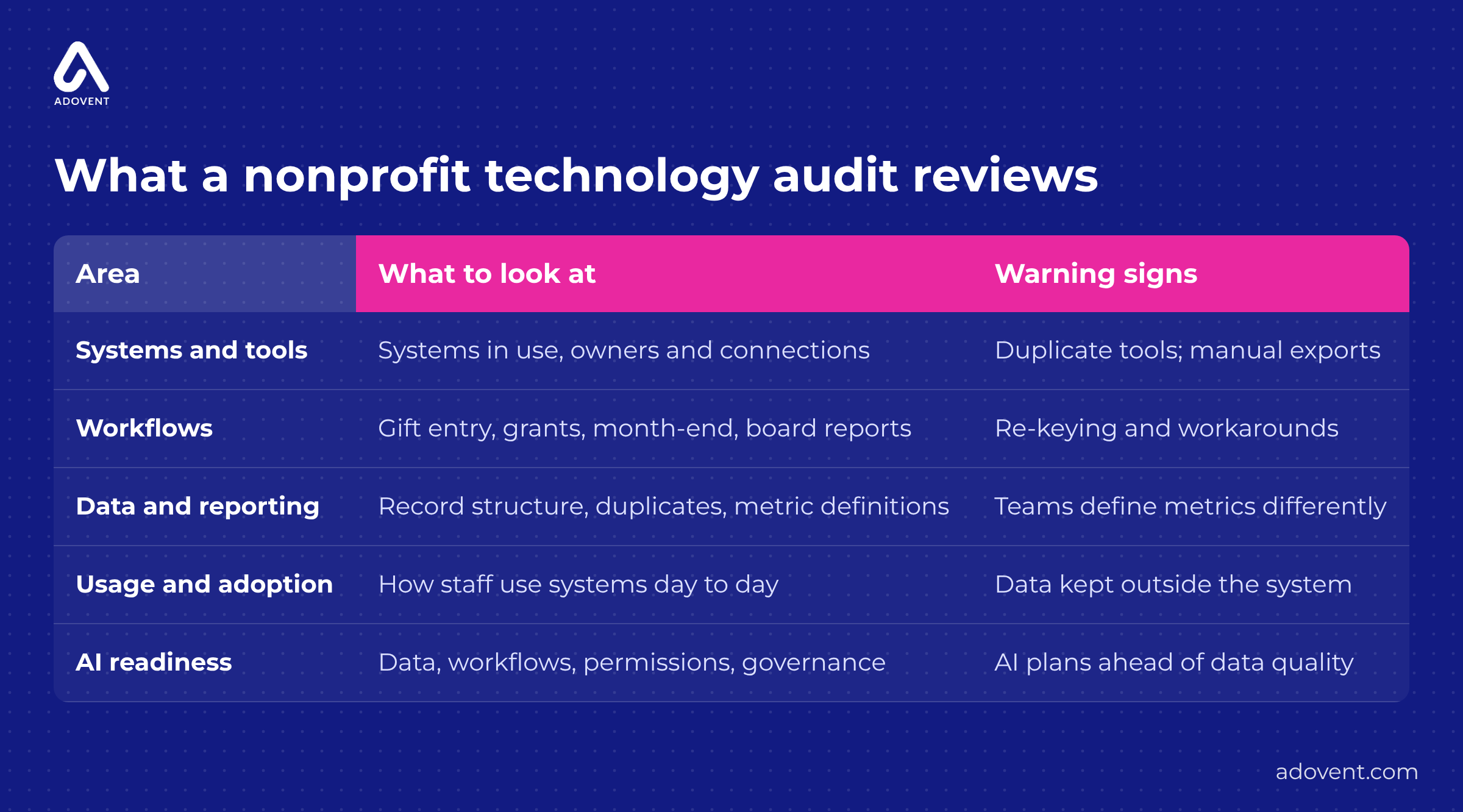
The five areas a practical nonprofit technology audit should review.
1. Your systems and tools
Start with a full list of every system in use, who owns it and what it connects to. Include the unofficial tools, too. The events team’s sign-up form. The shared folder called “FINAL donor list v3.” The old database on someone’s desktop that nobody wants to touch.
What to do: Mark every place where data moves between systems by hand. Those are the first candidates for an integration, which is an automatic link that passes information from one system to another.
2. How the work actually gets done
Next, sit with staff while they do real tasks: entering a gift, sending a thank-you letter, closing the month, pulling a renewal list. Watch and take notes. The phrase to listen for is “and then I copy it into…”
What to do: Count the copy-and-paste steps in your five most common tasks. Each one costs time and invites errors.
3. Your data and reports
This is usually where the biggest problems hide. Check for duplicate records, such as the same donor entered three times with slightly different spellings. Then ask three people how they define an “active donor.” If you get three answers, you have found why the reports never match. (If you are planning a move to a new system, our nonprofit CRM data migration checklist shows how to clean records before they move.)
What to do: Agree on written definitions for your ten most important numbers before anyone builds a new dashboard (a visual summary of key numbers). A dashboard is only as reliable as the data underneath it.
4. How staff use the systems
A system that exists is not the same as a system that works. Talk to the people who use it every day, not only the people who bought it. You will often find features that were set up at launch and never used.
What to do: Compare what the system was set up to do with what staff actually use it for. The gap shows where training or simpler screens would pay off. Ongoing managed services can keep that improvement going after launch.
5. Whether you are ready for AI
Leadership may want to try AI, for example to draft a funder report from program notes. That only works if the notes are complete, stored in one place and protected by the right access rules.
What to do: Choose one practical AI idea and check whether the data it needs is clean and easy to find. If it isn’t, fix the data first. Practical AI starts with readiness, not hype. Our AI readiness page explains what we check.
How does a nonprofit technology audit work, step by step?
Every audit is shaped around the organization, but the core steps stay the same.
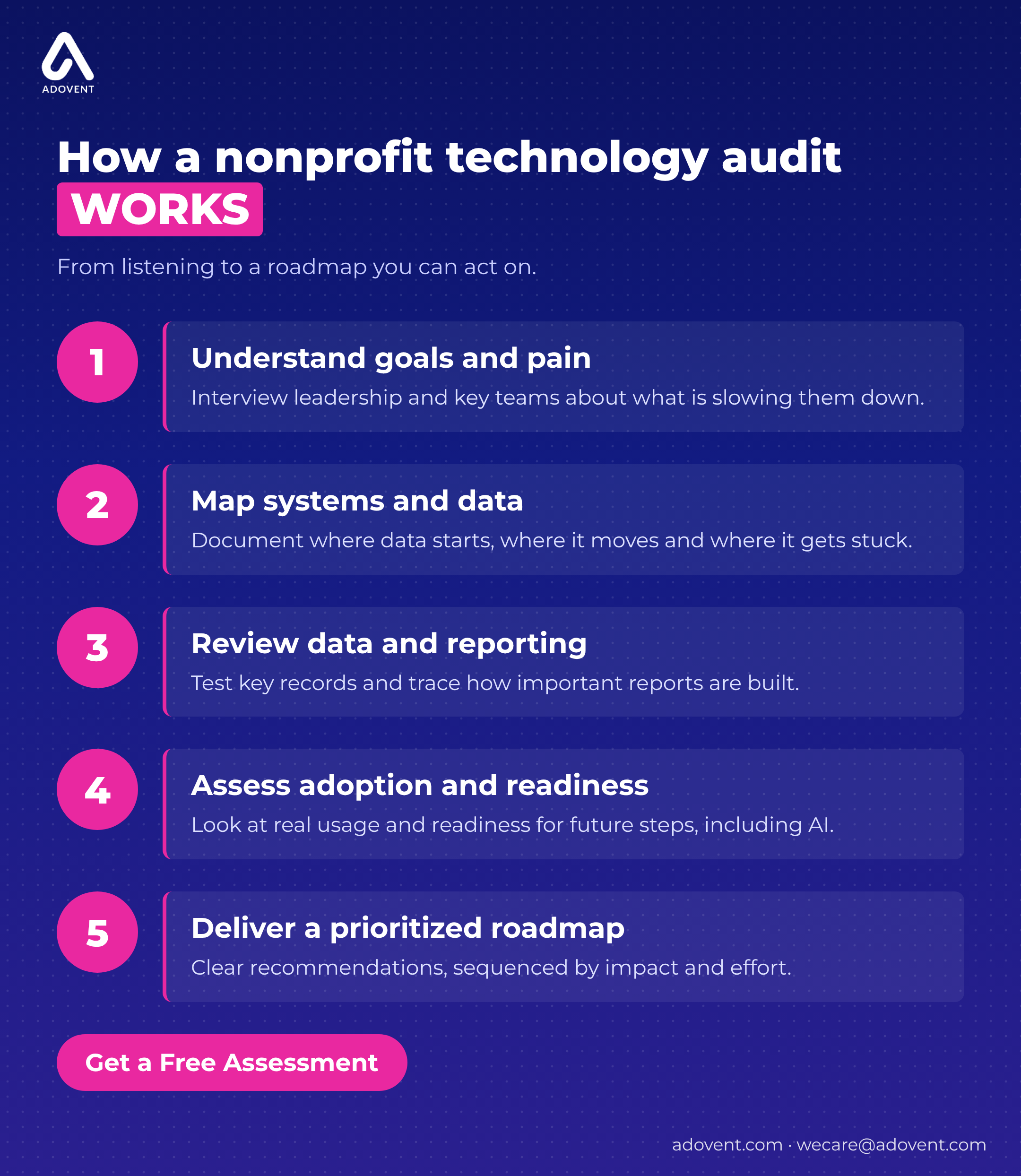
- Understand goals and pain points. We interview leadership first, then each team that works in the systems. We ask what slows them down and what they have stopped asking for.
- Map systems and data. We draw a simple picture of where information is first entered, where it travels and where it gets stuck.
- Review data and reporting. We spot-check key records and trace how your most important reports are built. This step usually explains why numbers don’t match.
- Assess adoption and readiness. We look at how people really use each system, and whether your data and processes are ready for next steps, including AI.
- Deliver a prioritized roadmap. We turn the findings into a step-by-step plan in order of priority: what to do now, what to plan for and what can wait.
Timing depends on how many systems and teams are involved.
After the audit: should you fix or replace your systems?
In most cases, fix first. Many problems blamed on “the CRM” come from setup choices made in a hurry, a link between systems that was cut to save budget, or training that happened once, two years ago.
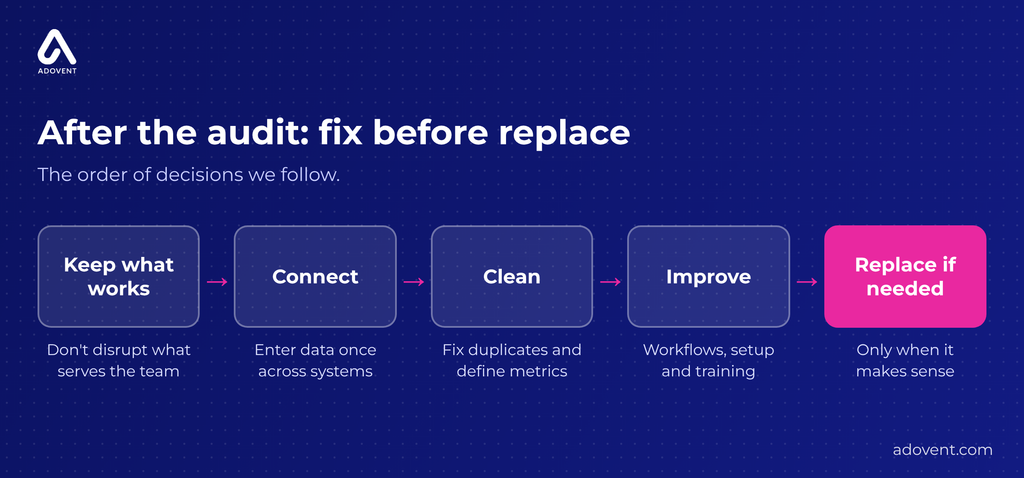
Take a membership association whose renewal reports never match finance. Replacing the whole system would take months and retrain every team. Instead, connecting the membership system to accounting and cleaning duplicate member records solves the real problem with far less disruption.
So the order we follow is simple. Keep what works. Connect the systems that belong together. Clean the data people need to trust. Improve the processes that frustrate staff. Replace a system only when it truly can’t do the job.
When replacement is the right call, the audit still pays off. You go into the search knowing exactly what you need, instead of hoping a sales demo fits. Our Nonprofit CRM Migration Playbook covers the decisions to make before you move any data.
Where Adovent fits
Adovent helps nonprofits and associations get more from Microsoft-based systems for fundraising, membership, finance and reporting, including Dynamics 365, SylogistMission and Power BI (Microsoft’s reporting tool). Many of these tools are available to eligible nonprofits at reduced cost through Microsoft’s nonprofit offers. Our Technology Audit starts with how your team really works. We do not start by assuming you need new software. If you already run a Microsoft-based CRM, see what good looks like for nonprofit CRM in 2026.
FAQs
What is the difference between a technology audit and an IT audit?
An IT audit asks whether your laptops are patched and your backups actually run. A technology audit asks a different question: why does it take Sarah in finance two days to reconcile the gala? We care less about the server closet and more about the spreadsheet on Sarah’s desktop. Plenty of organizations need both. Just ask up front which one you’re paying for.
Who should be involved in a nonprofit technology audit?
Your executive director should be in the first meeting, because the audit needs a clear goal from the top. After that, the most useful hour is usually spent with the person who enters gifts every Monday morning. She knows which screen freezes, which field everyone skips and which report gets rebuilt by hand. Leave her out and you’ll miss half the story.
Does an audit mean we will have to buy new software?
Usually not. On a typical audit, the fixes look like this: turn on a duplicate check that was switched off at launch, connect the CRM to accounting so gifts flow over overnight, and give the events team a one-page guide. That’s it. New software only comes up when a system genuinely can’t handle something you need, like tracking grant spending by program.
How often should a nonprofit review its technology?
Every two to three years is a sensible rhythm for most teams. [Confirm or remove this guideline.] Bring it forward if something big changes. A new executive director, a merger, a shift from events to monthly giving, or the third board meeting in a row where someone asks “which number is right?”
Can a technology audit tell us if we are ready for AI?
It can, and it often saves money. Say your team wants AI to draft quarterly funder updates. The audit checks the boring part first: are program notes stored in one place, are they complete, and who is allowed to see them? If the notes live in five inboxes, the AI tool will write confident nonsense. Fix that first, then try AI on one report.
Leave a Reply