
How Do You Calculate Donor Retention Rate? Formula, Benchmarks and a Free Calculator
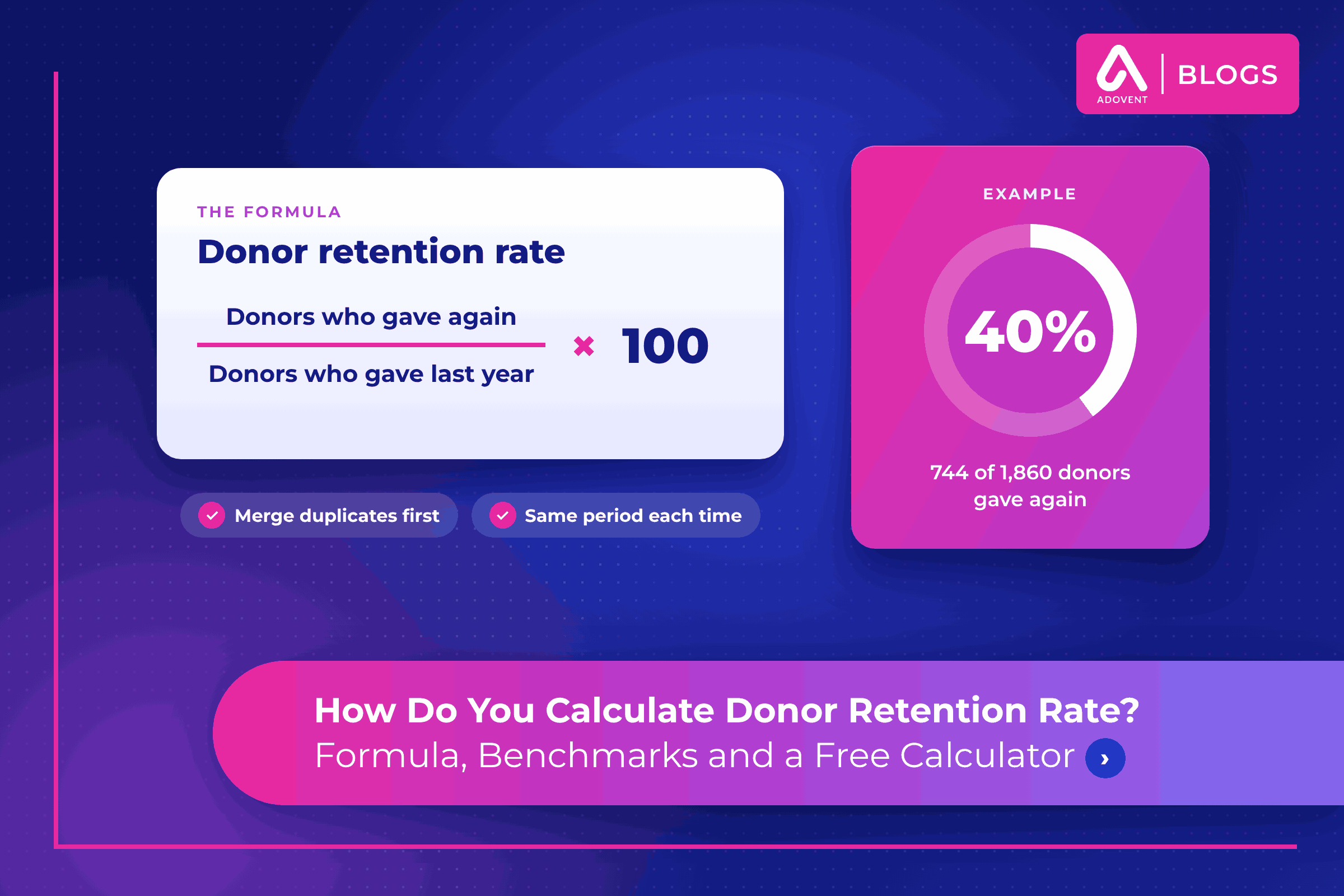
The donor retention rate formula is simple: take the donors who gave last year and also gave again this year, divide by everyone who gave last year, and multiply by 100.
Quick answer: Donor retention rate = (donors who gave in both periods ÷ donors who gave in the earlier period) × 100. If 1,860 people gave last year and 744 of them gave again this year, your retention rate is 40%.
Below: the formula, a worked example, a cited benchmark, five reasons your CRM and spreadsheet disagree, and how to track the number monthly.
What is the donor retention rate formula?
Donor retention rate measures how many of last period’s donors came back. It counts people, not dollars.
Donor retention rate = (donors who gave in both periods ÷ donors who gave in the earlier period) × 100
Two details trip people up. First, people who gave for the first time this year are not in the formula. They belong in a separate acquisition count. Second, “period” must mean the same 12 months every time, calendar year or fiscal year. Pick one and write it down.
The opposite number is donor attrition: 100 minus your retention rate.
How do you calculate donor retention rate step by step?
Our example is a regional literacy nonprofit with a July to June fiscal year. Its donor operations manager is preparing the October board packet.
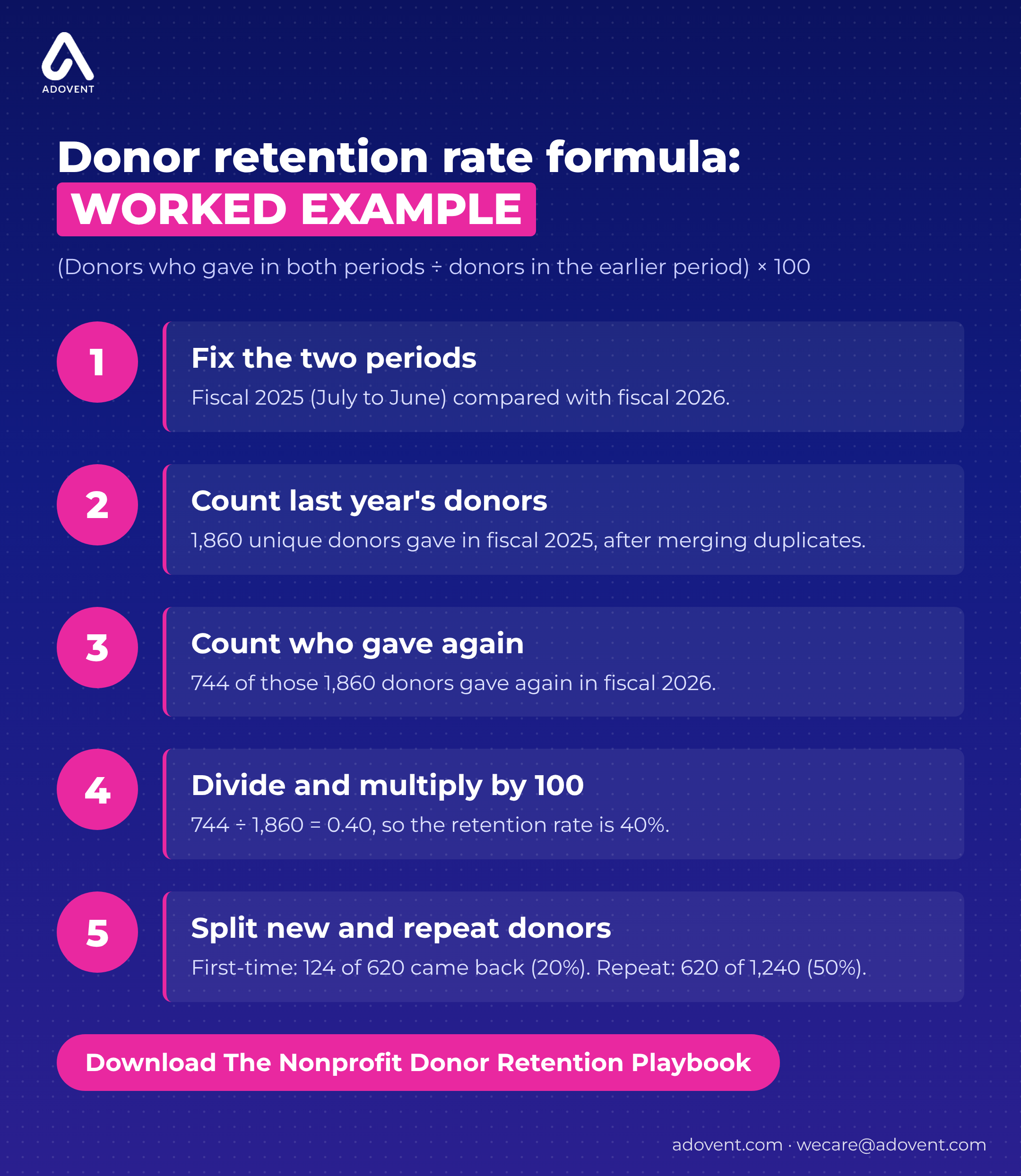
- Fix the two periods. The earlier period is fiscal 2025 (July 1, 2024 to June 30, 2025). The later period is fiscal 2026.
- Count unique donors in the earlier period. After merging duplicate records, 1,860 individuals and households gave at least one gift in fiscal 2025.
- Count who gave again. Of those 1,860 donors, 744 made at least one gift in fiscal 2026.
- Divide, then multiply by 100. 744 ÷ 1,860 = 0.40. The retention rate is 40%.
- Split new and repeat donors. Of the 1,860, 620 were first-time donors in fiscal 2025 and 124 of them gave again (20%). The other 1,240 were repeat donors and 620 came back (50%). One average hid two very different stories.
In a spreadsheet, put last year’s donor count in cell B2 and the returning count in C2. Then use =C2/B2 and format the cell as a percentage.
What is a good donor retention rate?
A widely cited sector benchmark comes from the Fundraising Effectiveness Project (FEP), published with the Association of Fundraising Professionals (AFP). Its 2025 data shows that overall donor retention edged up from 43.1% in 2024 to 43.3% in 2025, with repeat donor retention improving and new donor retention essentially flat, according to AFP’s April 2026 FEP release.
Our literacy nonprofit at 40% sits a little below that figure. The split matters more: its 20% first-time return rate is where most donors are lost. A benchmark mixes many causes and sizes, so treat it as context. Your own three-year trend tells you more.
What to do: Calculate the last three years with one definition and compare yourself to yourself. Show the FEP figure in the board packet only with its source and year.
Why does your CRM give a different number than your spreadsheet?
The formula is the same everywhere. The counts going into it are not.
1. Duplicate records split one donor in two
A donor gives $100 in fiscal 2025 as “Rebecca Okafor” and $150 in fiscal 2026 as “Becky Okafor-Hayes” with a new email. The CRM sees one lapsed donor and one new donor. Retention drops, acquisition rises, and neither is true.
Fix: Merge duplicate records (combine records that describe the same person) before you count, and repeat the check every quarter. Our nonprofit CRM data migration checklist covers matching rules you can reuse.
2. Soft credits get counted as gifts
A soft credit is recognition for someone who influenced a gift but did not pay it, such as a board member who asked a friend. The database coordinator’s export includes soft credits. The development director’s spreadsheet does not. So 90 board members and spouses count as “retained donors” in one version only.
Fix: Decide once whether soft credits count toward retention. Most teams count only the person or household that actually paid.
3. Fiscal year in one place, calendar year in another
The CRM report runs January to December. The board runs July to June. A donor gives in March 2025 and again in September 2025. On the fiscal view, those gifts fall in fiscal 2025 and fiscal 2026, so she is retained. On the calendar view, both gifts fall in 2025, and she is not retained from 2024 unless she also gave that year.
Fix: Match the period your board already uses, and label every retention figure with its dates.
4. Households in one count, individuals in another
A married couple gives a joint $500 gift every spring. The spreadsheet counts one household. The CRM counts two contacts, and only one is linked to this year’s gift. One looks retained, the other lapsed.
Fix: Choose household or individual counting for retention, then apply it to both periods the same way.
5. Not everyone agrees on what a “gift” is
Event ticket buyers, in-kind donors, unpaid pledges and refunded gifts all sit in the same database. The gala alone added 210 ticket buyers last year. Include them in one report and exclude them in another, and the rates will never match.
Fix: List which transaction types count as a gift for retention. Keep that list next to the report.
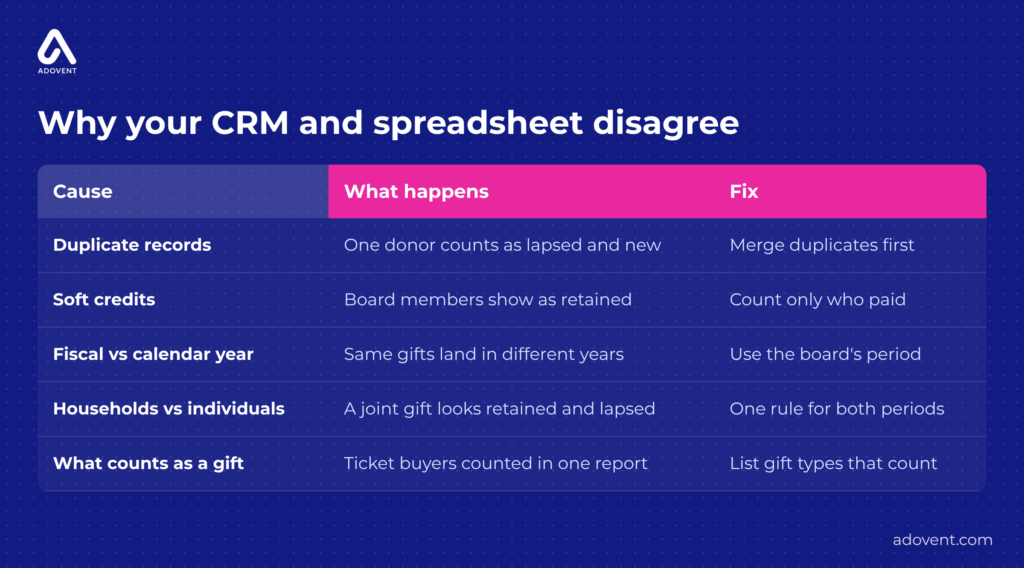
Five reasons two honest reports can show two different retention rates.
How do you track donor retention every month without rebuilding the report?
An annual number reports the past. A monthly view gives your team time to act.
6. Write the definition down once
The development director, the database coordinator and the controller each pull retention differently. Every board cycle starts with an argument about whose number is right. A one-page definition ends that: periods, household or individual, soft credits, gift types, duplicate check.
What to do: Agree on it with fundraising and finance, and store it where everyone who reports the number can find it.
7. Build it once and let it refresh
Instead of a monthly Excel export, build the retention measure once and show it in Power BI, Microsoft’s reporting tool. Power BI can read from Dataverse, the database underneath Dynamics 365, and refresh on a schedule, according to Microsoft Learn. Use a rolling view: donors from the 12 months before last who also gave in the last 12 months. Our post on board-ready reporting in a Microsoft-based CRM covers the data checks underneath.
What to do: Build the item 6 definition into the report, so nobody recalculates it by hand.
8. Turn the number into a “not yet renewed” list
By March, 1,310 of the 1,860 fiscal 2025 donors at our literacy nonprofit had not given again. A rate alone does not help the annual fund manager. A saved list does, sorted by last gift date and amount, so the team can follow up before June 30.
What to do: Pair the monthly retention figure with a “not yet renewed” view in the CRM that the fundraising team reviews every month.
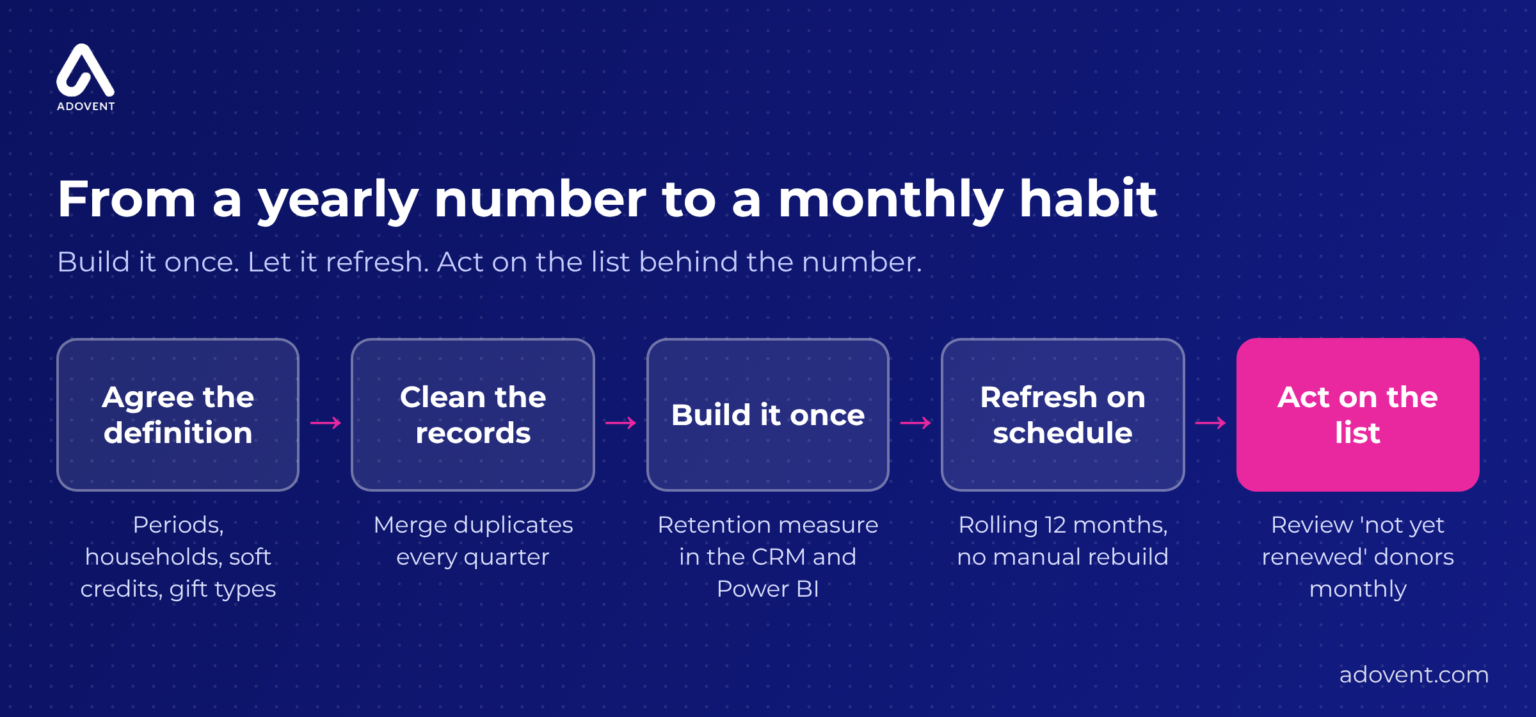
From a once-a-year calculation to a number your team can act on monthly.
Where Adovent fits
Adovent is a Sylogist partner and a Microsoft partner working with nonprofits and associations. When retention numbers disagree, we start below the dashboard. We learn how your team records gifts, check the data for duplicates and mismatched rules, fix what is broken, and build Power BI retention reporting that refreshes itself. We do not start by assuming you need new software. See our nonprofit services, including Reporting and Power BI.
FAQs
What is the difference between donor retention rate and donor attrition rate?
Retention is the share of last period’s donors who gave again. Attrition is the share who did not, so attrition equals 100 minus retention.
Should we calculate donor retention by calendar year or fiscal year?
Use the period your board and finance team already report on. Then use the same period every time and label the dates on every report.
Do recurring monthly donors count in donor retention?
Yes. A monthly donor who gave in both periods is a retained donor. Because their gifts repeat automatically, also track them as a separate segment so you can see how one-time donors are doing.
How is donor retention rate different from dollar retention?
Donor retention counts people. Dollar retention compares this year’s giving from last year’s donors with what they gave last year. A board packet can show both.
How often should we calculate donor retention rate?
Calculate the official rate once a year, at year end. Track a rolling 12-month version monthly so the team can follow up before the year closes.
Conclusion
The donor retention rate formula takes one line. Getting two systems to agree takes a definition.
Count unique donors, keep the same period, and settle soft credits, households and gift types once.
Then build it so it refreshes, and give your team the list behind the number.
Leave a Reply