
Dynamics 365 for Nonprofits: Is It the Right Fit for You?
Dynamics 365 for nonprofits is Microsoft’s family of business apps, set up so one organization can track donors, programs, grants and finance in a single connected system.
Quick answer: Dynamics 365 is a strong fit when your staff already work in Microsoft 365, your fundraising and finance teams need to agree on the same numbers, and someone will own the system after launch. If your real problem is messy data or no internal owner, fix that first.
Below, we explain what Dynamics 365 actually is in plain words, the signs it fits, the signs to pause, and a five-step fit test you can run with your team this month.
What is Dynamics 365 for nonprofits, in plain words?
Dynamics 365 is not one product. It is a set of Microsoft apps that share one database underneath, called Dataverse. The part most nonprofits start with is the CRM: the database where you keep track of donors, members and the people you serve.
Around it sit tools many teams already pay for. Staff keep working in Outlook and Teams. Power BI, Microsoft’s reporting tool, turns the data into dashboards (a visual summary of your key numbers). Power Automate handles routine steps, such as creating a thank-you call task when a large gift comes in.
Nonprofits usually run it one of two ways. Some use a packaged nonprofit solution built on Dynamics 365, such as SylogistMission CRM for fundraising and SylogistMission ERP for funds, grants and finance. Others build on standard Dynamics 365 and shape it around their own processes. We compare the two in Packaged vs Custom on Dynamics 365.
One date matters right now. Fundraising and Engagement, an older Microsoft nonprofit add-on for Dynamics 365, reaches end of support at 11:59 PM Pacific Time on December 31, 2026, according to Microsoft Learn. A new project should not be planned around it.
So “Dynamics 365 for nonprofits” really means two decisions: a platform and a setup. The platform rarely decides success. The setup does.
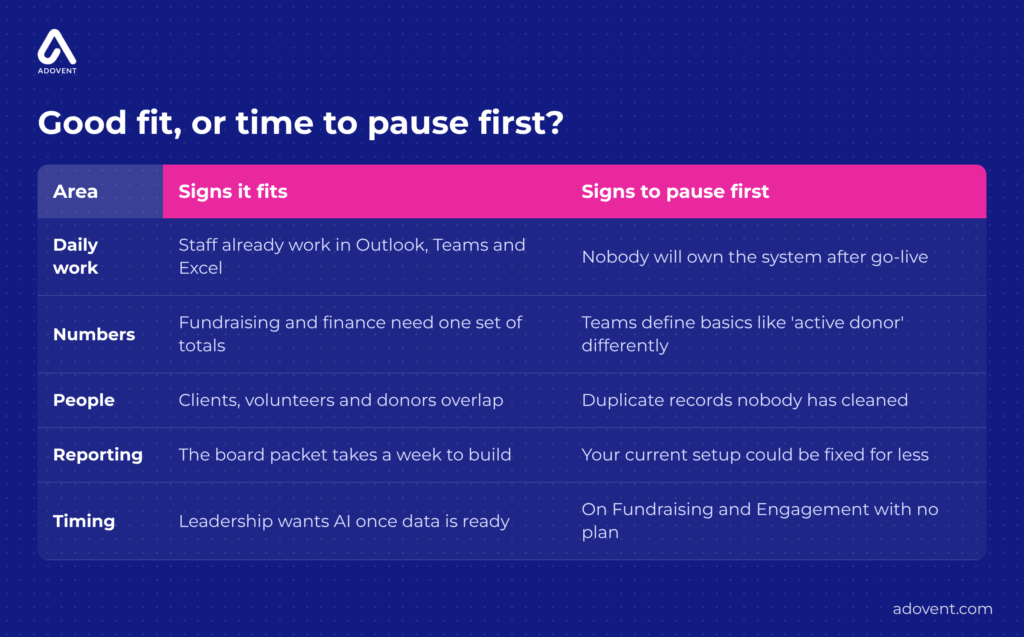
Five areas to check before you commit to Dynamics 365.
Signs Dynamics 365 is a good fit for your nonprofit
1. Your team already lives in Outlook, Teams and Excel
Microsoft-based CRM works best where Microsoft is already the daily habit. Picture a major gifts officer who finishes a donor lunch, writes notes in an Outlook email, and then retypes them into a separate donor database on Friday afternoon. Half of those notes never make it across. With Dynamics 365, that email and meeting can be saved to the donor’s record straight from Outlook. As a result, the next person who calls that donor knows what was promised.
What to do: Ask three staff how many hours a week they spend copying information between Microsoft tools and your current database. That number is your first real argument, for or against.
2. Fundraising and finance keep reporting different totals
The development director reports $286,000 raised for the spring appeal. The controller’s books show $271,400. It takes three days to find out why: pledges counted as revenue in one system, and two refunds entered in only one place. This happens every quarter, and every quarter the board loses a little trust. Dynamics 365 can connect your CRM to a Microsoft-based finance system, such as SylogistMission ERP, through an integration (an automatic link that passes information from one system to another).
What to do: Agree on what “raised” means before you compare any software. Then check that gifts can flow from the CRM to finance without being typed twice.
3. The same people show up as clients, volunteers and donors
A woman picks up groceries from your pantry in spring, volunteers on Saturdays all summer, and gives $50 in December. Today she lives in three places: an intake spreadsheet, a volunteer scheduling tool and the donor database. Nobody sees the whole relationship. Dynamics 365 can hold program, volunteer and giving activity on one contact record, with permissions controlling who sees what. That protects the relationship and makes impact reporting far easier.
What to do: For one real person, list every place their information is stored today. If the list runs past three, a shared record will save time and mistakes.
4. Your board packet takes a week to build
Every quarter, the operations manager exports four spreadsheets, fixes the date formats and rebuilds the same charts in PowerPoint. Power BI can read directly from Dynamics 365, so charts refresh instead of being rebuilt. However, a dashboard only shows what the data underneath says. One reliable view starts below the dashboard. Our post on board-ready reporting in a Microsoft-based CRM covers that trust layer.
What to do: Write down the ten numbers your board asks for every quarter. If most combine donor, program and finance data, a connected Microsoft setup will earn its keep.
5. Leadership is asking about AI
Your executive director sees Copilot, Microsoft’s AI assistant, draft a donor summary in a demo and asks whether you can do that by spring. Copilot works from the data it is allowed to see. If a major donor has three duplicate records and her history sits in someone’s inbox, the summary will be wrong, and it will sound confident. Dynamics 365 keeps your data, permissions and Microsoft AI tools in one place, which helps once the foundations are ready.
What to do: Treat AI as a later step, not the reason to buy. Our AI readiness page explains what to check first.
Signs to pause before choosing Dynamics 365
6. Nobody will own the system after go-live
Go-live is the day a new system launches. The database manager who set up your current system left in June. Since then, three people share the admin login and nobody changes anything. A new platform will drift the same way within a year. Dynamics 365 is flexible, which also means someone has to look after how it was set up (its configuration) as your programs change.
Fix: Name an internal owner before you sign anything. Then decide whether ongoing help comes from staff or a support partner. Here is what CRM support after go-live looks like.
7. The real problem is the data, not the software
Your development director counts an “active donor” as anyone who gave in the last 12 months. The database coordinator uses 18 months. The annual fund manager counts anyone who ever gave to the annual fund. Moving that confusion into Dynamics 365 just gives you a faster way to disagree. Duplicates follow the same rule. Clean data stays your job, before launch and long after it.
Fix: Agree on your ten most important definitions and merge duplicate records first. Do not automate a mess.
8. Your current setup could be fixed for less
Some organizations already on Dynamics 365 want to leave because nobody uses it. Look closer, and the cause is often small: two broken automated steps, no training since launch, and reports nobody updated after programs changed. Fix those, and staff come back. Replacing the system would have cost far more and repeated the same gaps.
Fix: Run a nonprofit technology audit before deciding. We do not start by assuming you need new software.
9. You are on Fundraising and Engagement and hoping to wait
A development team plans to “deal with it after the gala in February.” After December 31, 2026, Microsoft support for Fundraising and Engagement ends, so new problems will have no Microsoft fix. Waiting also leaves less time to clean data before a move. Don’t panic. Plan.
Fix: Choose your target path now, whether SylogistMission CRM or another Dynamics 365 setup, and start cleaning donor data this quarter, even if the move itself happens next year.
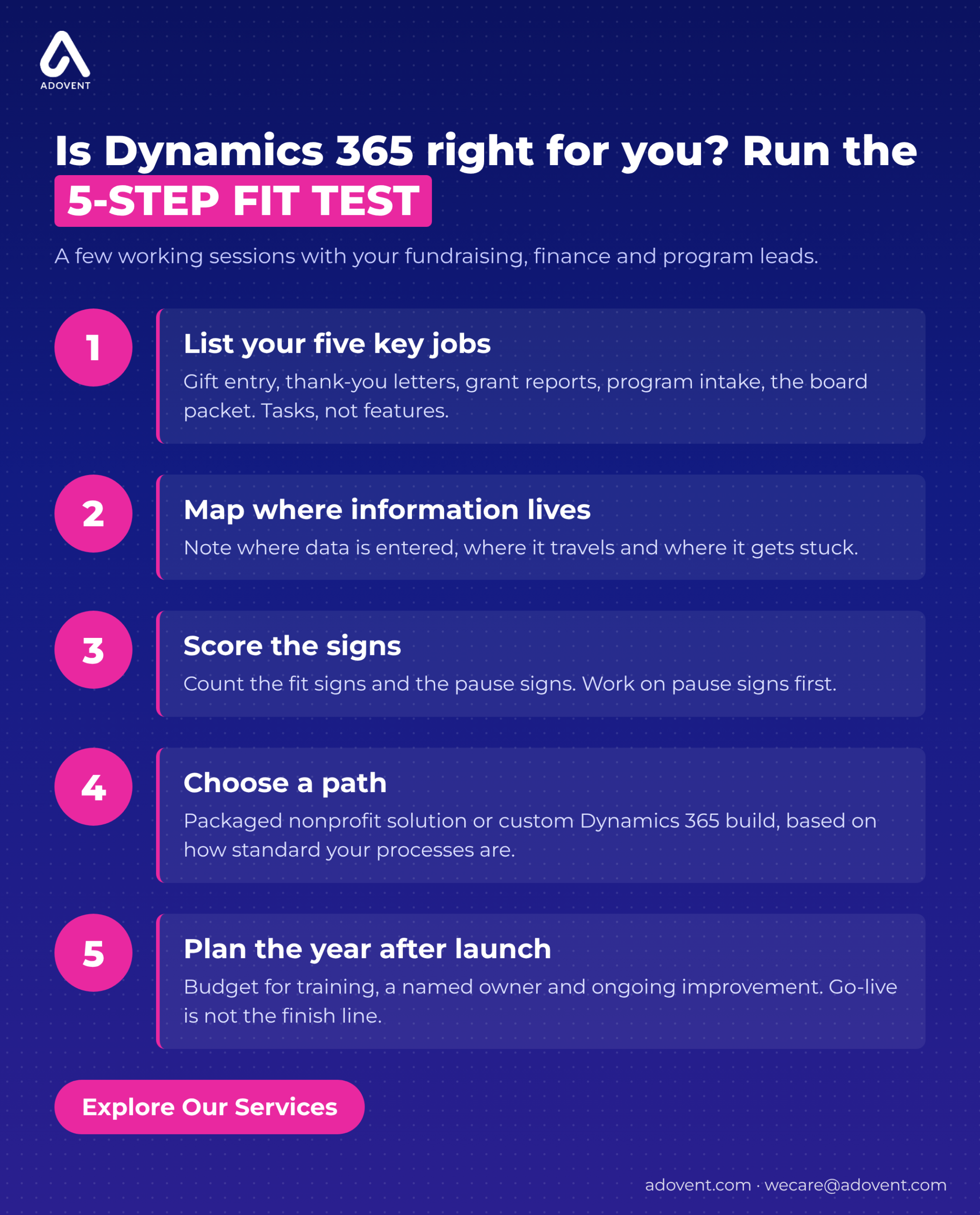
How do you decide if Dynamics 365 is right for your nonprofit? A 5-step fit test
You can run this test in a few working sessions with your fundraising, finance and program leads. None of it needs new software.
- List the five jobs that matter most. Write them as weekly tasks, such as gift entry, thank-you letters, grant reports, program intake and the board packet. Leave product features out of this list.
- Map where information lives today. For each job, note where data is first entered, where it travels and where it gets stuck. Those stuck points are your real requirements.
- Score the signs above. Count how many of signs 1 to 5 apply, and how many of signs 6 to 9. More fit signs means Dynamics 365 deserves a closer look. Pause signs go to the top of the to-do list either way.
- Choose a path, not just a platform. Decide between a packaged nonprofit solution and a custom Dynamics 365 build, based on how standard your fundraising and finance processes are.
- Plan the year after launch. Budget time and money for training, a named owner and ongoing improvement. Go-live is not the finish line.
Where Adovent fits
Adovent is a Sylogist partner and a Microsoft partner focused on nonprofits and associations. We start with the problem, then decide what actually needs to change. That means understanding how your teams work, assessing your systems, data and adoption, implementing only what fixes the gap, and staying to support and improve after launch. Sometimes the answer is Dynamics 365 or SylogistMission. Sometimes it is a better-connected version of what you already have. Our implementation services page shows how that work runs.
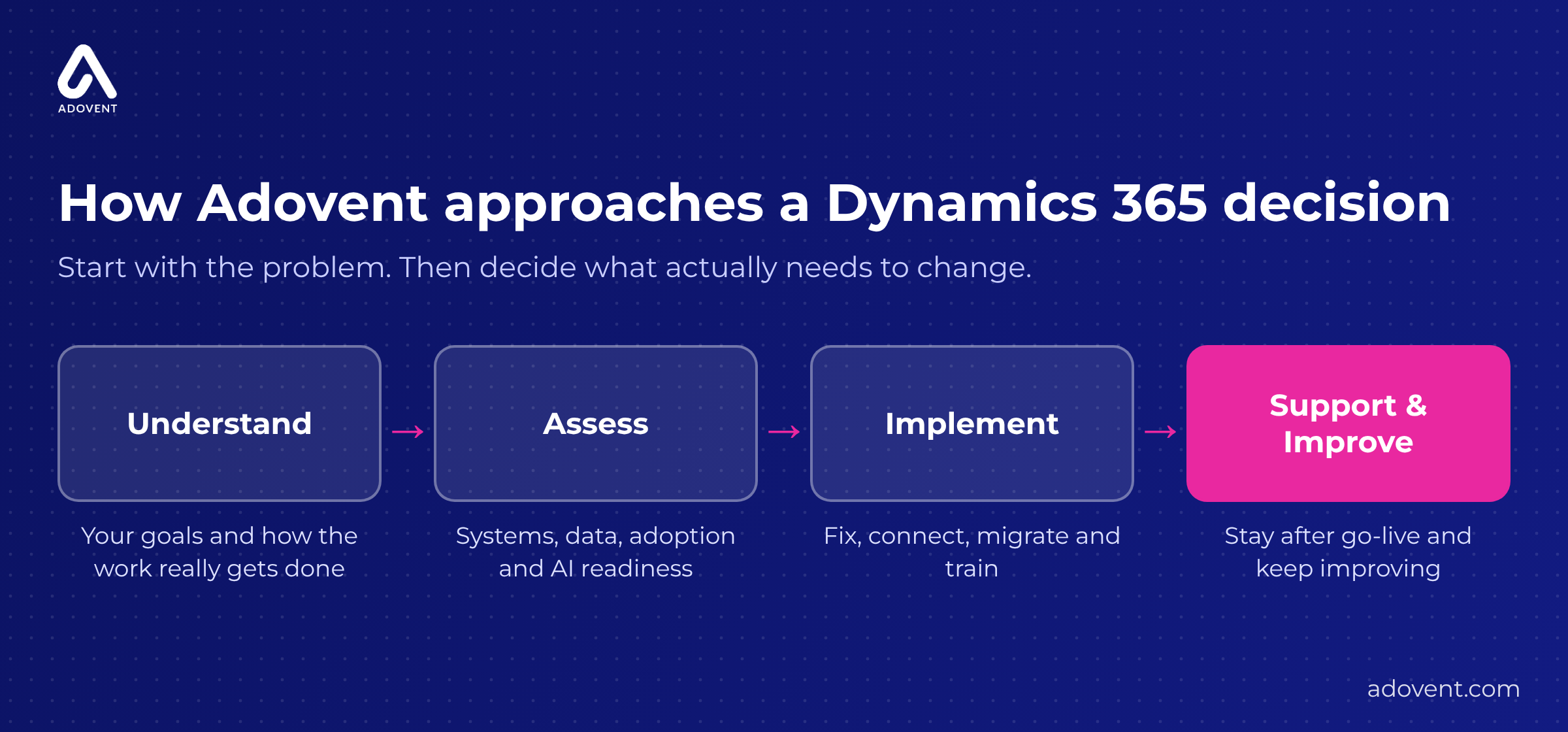
How we take a nonprofit from first question to a system staff actually use.
FAQs
Is Dynamics 365 free for nonprofits?
No. Microsoft offers grants and discounts on many licenses for eligible nonprofits, and the current terms are listed on Microsoft’s nonprofit pages. Licenses are also only part of the cost. Setup, data cleanup, training and ongoing support usually matter more to the total. [Pricing details last checked: October 19, 2026. Confirm before publishing.]
Is Dynamics 365 only for large nonprofits?
No. Complexity matters more than size. A small nonprofit with programs, grants and donors that overlap can benefit more than a large one that only processes gifts. What every organization needs is a clear owner and a setup that matches how staff work.
What is the difference between Dynamics 365 and SylogistMission CRM?
Dynamics 365 is Microsoft’s platform. SylogistMission CRM is a nonprofit fundraising solution built on top of it, with donor, gift and campaign features already shaped for nonprofits. SylogistMission ERP adds fund accounting (tracking money by fund and restriction) on the same Microsoft foundation.
What happens to Fundraising and Engagement after December 31, 2026?
Microsoft states that support for Fundraising and Engagement ends at 11:59 PM Pacific Time on that date. Organizations using it should choose a new path and plan their donor data move. Our nonprofit CRM data migration checklist is a good starting point.
How long does it take to move to Dynamics 365?
It depends on how much data you have, how clean it is, how many systems need to connect, and whether you use a packaged solution or a custom build. A technology audit gives you a realistic plan before you commit to dates.
No. Microsoft offers grants and discounts on many licenses for eligible nonprofits, and the current terms are listed on Microsoft’s nonprofit pages. Licenses are also only part of the cost. Setup, data cleanup, training and ongoing support usually matter more to the total. [Pricing details last checked: October 19, 2026. Confirm before publishing.]
No. Complexity matters more than size. A small nonprofit with programs, grants and donors that overlap can benefit more than a large one that only processes gifts. What every organization needs is a clear owner and a setup that matches how staff work.
Dynamics 365 is Microsoft’s platform. SylogistMission CRM is a nonprofit fundraising solution built on top of it, with donor, gift and campaign features already shaped for nonprofits. SylogistMission ERP adds fund accounting (tracking money by fund and restriction) on the same Microsoft foundation.
Microsoft states that support for Fundraising and Engagement ends at 11:59 PM Pacific Time on that date. Organizations using it should choose a new path and plan their donor data move. Our nonprofit CRM data migration checklist is a good starting point.
It depends on how much data you have, how clean it is, how many systems need to connect, and whether you use a packaged solution or a custom build. A technology audit gives you a realistic plan before you commit to dates.
Conclusion
Dynamics 365 is a strong platform for nonprofits. That alone does not make it right for yours.
It fits when Microsoft is already your daily habit and your teams need one set of numbers.
It disappoints when nobody owns it, or when messy data moves in with it.
Fix the setup before you replace the system. Then choose the platform with clear eyes.
Ready to see what a connected Microsoft setup could look like for your team? Explore Our Services.
Pingback: Fundraising and Engagement Retirement: What to Do Now